

Field types
By the end of this page you will know every field type TrazoForms offers, what data each one saves, and the settings unique to it. All of them (19 in the free version, plus the Pro Page break) share a common set of field settings; this page covers only what is specific to each type.
Text and numbers
Section titled “Text and numbers”| Field | What it does |
|---|---|
| Single line text | A short answer. You can require the whole answer to match a regular expression; an invalid expression is never saved, and you see a warning instead. |
| Paragraph text | A longer answer, with a configurable number of visible rows. |
| Number | Accepts numbers only, with an optional minimum, maximum and step. With no step, only whole numbers are accepted; 0.01 accepts amounts with cents. The visitor’s browser shows the decimal separator of their own language; the value is always stored in a standard, canonical format. |
| Hidden field | Not shown to visitors. Its value can come from a fixed value you set, a URL parameter, a UTM parameter (source, medium, campaign, term or content), the page address or title, the referring page, the logged-in user’s email, name or ID, or the submission date or time. |
Contact details
Section titled “Contact details”| Field | What it does |
|---|---|
| Checks that the address is valid and suggests a fix for a likely typo (for example “Did you mean ana@gmail.com?”). It can ask for the email twice to confirm it; pasting into the second box is disabled, which is the point of asking twice. | |
| Phone | Formats the number for a country as it is typed, using the same library phone apps use. Offer a single fixed country or let the visitor choose from a list you configure (or every country). It is saved in international format, e.g. +506 8888-8888. |
| Website | Only the domain is typed (example.com); https:// is fixed in front and the address is always saved with https, even if http is entered. |
| Full name | First name, first last name and second last name — the Latin American convention of two surnames — each with its own label. You can turn any of the three parts off or rename it. |
| Address | Country, then Province or State (loaded from official ISO data for the chosen country), Canton, District, exact directions and an optional postal code. Defaults to Costa Rica and Heredia, and can allow “Other” for a country or province not on the list. Each part can be turned off, renamed or made to depend on the chosen country. |
Choices
Section titled “Choices”| Field | What it does |
|---|---|
| Dropdown | A single choice from a list. |
| Multi-select | Several choices from a list, with a built-in search box and an optional minimum and maximum number of choices, with a live counter. |
| Multiple choice | A single choice shown as radio buttons. It can add an Other option with a text box; what the visitor types is what gets saved. |
| Checkboxes | Several choices. It can show a “Select all” button, and the same optional minimum/maximum of choices as multi-select. |
Choice fields only accept values that exist among their options, even if someone manipulates the form in their browser. Options can be shown in one, two or three columns, with a choice of marker style for checkboxes; they go back to a single column on narrow screens. “Select all” only appears with JavaScript — without it, visitors check each box themselves.
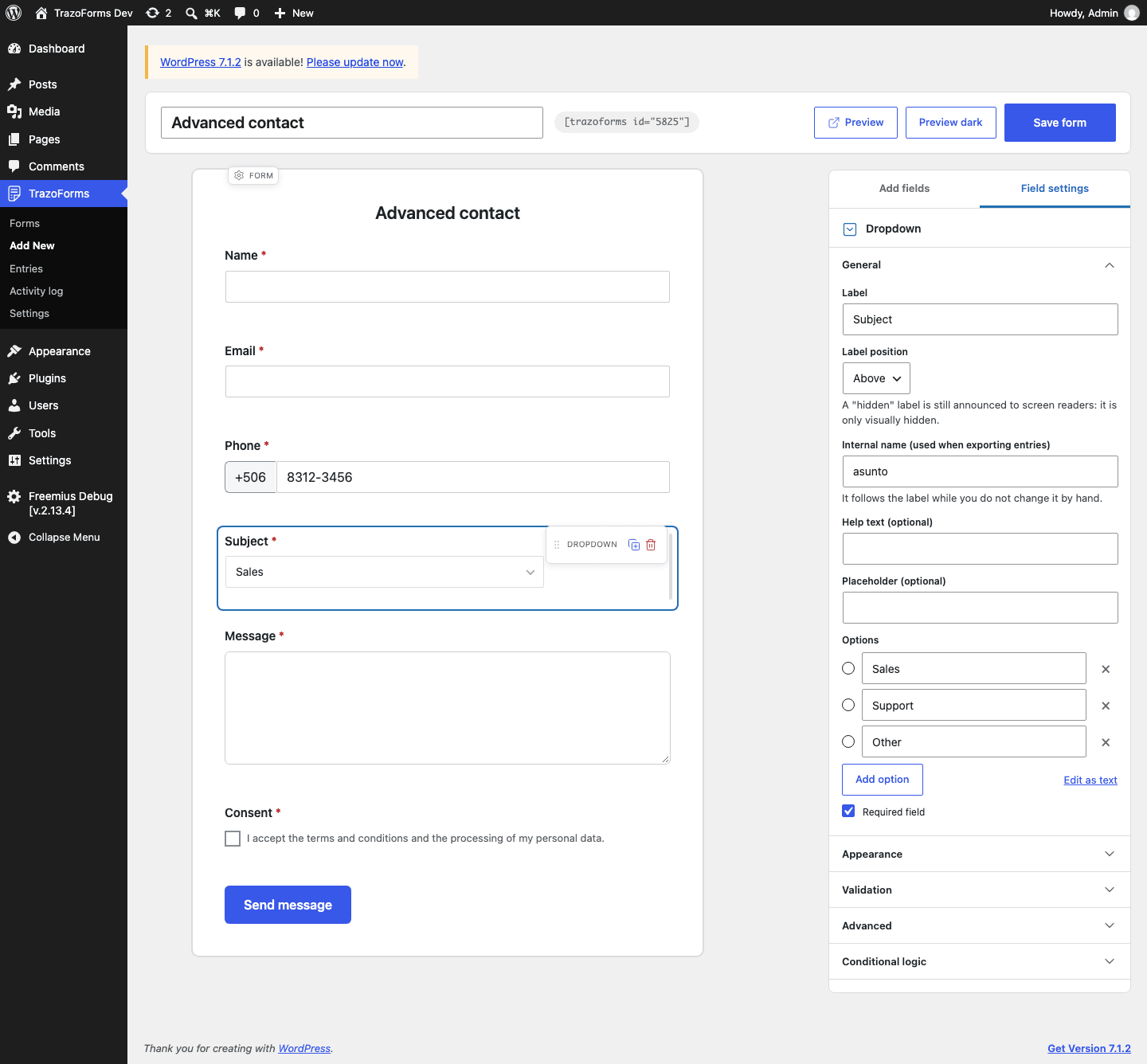
To write the options, see Options.
Dates and files
Section titled “Dates and files”| Field | What it does |
|---|---|
| Date | Uses the browser’s own date picker, in the format you choose (day/month/year by default), and checks that the date exists. Limits can be relative to today (e.g. “at least 18 years ago”) or fixed dates, and it can default to today. Saved as YYYY-MM-DD. |
| Time | Uses the browser’s own time picker, in 24-hour or 12-hour format, and can default to the current time. Saved as 24-hour HH:MM. |
| File upload | Accepts the file types and maximum size (MB) you choose; only file types WordPress allows on your site are accepted, and the size can never exceed what your server accepts. Uploaded files are private: they are stored outside the public uploads folder, with an unguessable name, and only an administrator can download one. The free version accepts one file per field; TrazoForms Pro raises that to up to 10. A field created with a higher number under Pro keeps accepting that many even if the site later runs without a license — it is only creating a new field with more than one file, or raising the number on an existing one, that needs a license. |
Consent and layout
Section titled “Consent and layout”| Field | What it does |
|---|---|
| Consent | One or more checkboxes in the same block, each with its own text and its own Required switch — for example, a required checkbox for data processing and an optional one for a newsletter. Entries, emails and exports show what was and was not accepted, one column per checkbox. |
| HTML block | Your own content, written with the same visual editor WordPress posts use: headings, bold, lists, links, images, a “Code” tab, plus ready-made info and important-notice boxes. You can also paste a video link or a Google Maps link, and insert previous answers live with merge tags. It does not collect data. |
| Section break | A heading to group the fields that follow, with a choice of three separator styles (a full-width line, a line with a centered star, or blank space), line thickness and color, and extra spacing above and below. |
| Page break (Pro) | Splits the form into steps. See Multi-page forms. This field type only appears in Add fields with a Pro license; without one, an existing page break in a form you already built keeps working exactly as before. |
Next step
Section titled “Next step”Continue to Field settings for what every field type shares.